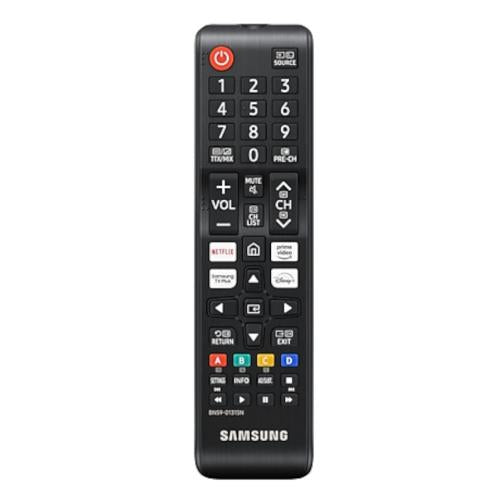
Samsung VG-TM1240AN/ZA Regular TV Remote Control - Samsung Parts USA
  • Samsung Remote Control - VG-TM1240AN/ZA is a genuine OEM Samsung Television replacement part that allows for easy operation of your TV.
  • Replaces a broken or unresponsive remote control, ensuring you can navigate your TV's functions seamlessly.
  • The remote control is designed to work with compatible Samsung television models, providing complete access to features.
  • Manufactured by Samsung, it guarantees OEM fit, original quality, and durable performance for your TV remote.
  • Helps restore full control over your television, enhancing your viewing experience without the need for a new TV.
Read More

$22.95

Compatible models

The Samsung Television Remote Control – VG-TM1240AN/ZA is the correct replacement for the following model numbers.

Description

Samsung Television Remote Control VG-TM1240AN/ZA

The Samsung Television Remote Control VG-TM1240AN/ZA is a genuine OEM replacement part designed to restore the functionality of your Television. Built to original factory specifications, this remote control ensures a proper fit, dependable operation, and long-lasting durability.

When the remote control becomes worn, damaged, or fails, replacing it restores your television's performance and helps reduce the risk of future issues. Enjoy seamless control over your viewing experience with a reliable remote.


Key Features

  • Genuine Samsung OEM replacement part
  • Reliable performance
  • Manufactured to original factory specifications
  • Proper fit and compatibility
  • Helps restore your Television to optimal working condition

Common Signs of a Faulty Remote Control

If your Television is experiencing any of the following issues, the Remote Control may need replacement:

  • Television not responding to remote commands
  • Buttons not functioning properly
  • Unusual delays in response time
  • Visible wear or damage to the remote
  • Intermittent connectivity issues
  • Remote not powering on

Installation Instructions

  1. Remove the old batteries from the remote control.
  2. Insert new batteries into the Samsung Remote Control.
  3. Ensure batteries are inserted correctly according to polarity.
  4. Test the remote functionality with your Television.
  5. Replace the battery cover securely.
  6. Recheck all buttons for proper operation.
  7. Store the remote in a safe place when not in use.
  8. Consult your television's manual for any specific pairing instructions.

Note: Always refer to your appliance's service manual or consult a qualified technician if you are unsure about the installation process.


Return Policy

  • Hassle-free returns within 30 days of purchase
  • Items must be unused and in their original packaging
  • Quick refunds issued after inspection of returned products
  • Free replacement for defective or damaged items
  • Friendly customer support for a smooth and transparent return process

Shop with Confidence

When you order from bekopartstore.com, you can shop with confidence knowing you're purchasing genuine Samsung OEM replacement parts backed by dependable customer service.

  • Genuine Samsung OEM replacement parts
  • Fast order processing and shipping
  • Secure online ordering
  • Hassle-free returns
  • Dedicated customer support

Samsung Television Remote Control VG-TM1240AN/ZA

The Samsung Television Remote Control VG-TM1240AN/ZA is a genuine OEM replacement part designed to restore the functionality of your Television. Built to original factory specifications, this remote control ensures a proper fit, dependable operation, and long-lasting durability.

When the remote control becomes worn, damaged, or fails, replacing it restores your television's performance and helps reduce the risk of future issues. Enjoy seamless control over your viewing experience with a reliable remote.


Key Features

  • Genuine Samsung OEM replacement part
  • Reliable performance
  • Manufactured to original factory specifications
  • Proper fit and compatibility
  • Helps restore your Television to optimal working condition

Common Signs of a Faulty Remote Control

If your Television is experiencing any of the following issues, the Remote Control may need replacement:

  • Television not responding to remote commands
  • Buttons not functioning properly
  • Unusual delays in response time
  • Visible wear or damage to the remote
  • Intermittent connectivity issues
  • Remote not powering on

Installation Instructions

  1. Remove the old batteries from the remote control.
  2. Insert new batteries into the Samsung Remote Control.
  3. Ensure batteries are inserted correctly according to polarity.
  4. Test the remote functionality with your Television.
  5. Replace the battery cover securely.
  6. Recheck all buttons for proper operation.
  7. Store the remote in a safe place when not in use.
  8. Consult your television's manual for any specific pairing instructions.

Note: Always refer to your appliance's service manual or consult a qualified technician if you are unsure about the installation process.


Return Policy

  • Hassle-free returns within 30 days of purchase
  • Items must be unused and in their original packaging
  • Quick refunds issued after inspection of returned products
  • Free replacement for defective or damaged items
  • Friendly customer support for a smooth and transparent return process

Shop with Confidence

When you order from bekopartstore.com, you can shop with confidence knowing you're purchasing genuine Samsung OEM replacement parts backed by dependable customer service.

  • Genuine Samsung OEM replacement parts
  • Fast order processing and shipping
  • Secure online ordering
  • Hassle-free returns
  • Dedicated customer support
Read More

Shipping & delivery

Does this part fit my model?

    Have a question?