$50.95
In stock 1655 Products
Fast shipping
Welcome To Samsung

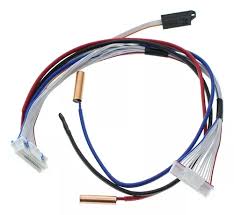
Ensure accurate humidity control in your Samsung air conditioner with the DB32-00272A Humidity Sensor. This sensor plays a critical role in detecting indoor moisture levels, helping the system adjust cooling performance for optimal comfort. A faulty sensor can result in improper humidity regulation and reduced comfort levels.
Built with sensitive and reliable electronic components, this humidity sensor delivers precise readings and stable performance over time. It ensures efficient communication with the control system for accurate environmental adjustments.
Installation / Replacement Instructions:
1. Turn off the air conditioner and disconnect power supply.
2. Open the indoor unit panel to access the sensor area.
3. Disconnect wiring from the faulty humidity sensor.
4. Remove the old DB32-00272A sensor carefully.
5. Install the new sensor and reconnect wiring securely.
6. Reassemble the unit and test humidity control function.
Compatible with select Samsung air conditioner models, this OEM-quality humidity sensor ensures accurate environmental sensing and reliable performance.
Key Features:
• Detects and regulates indoor humidity levels
• Ensures optimal comfort and air quality control
• High-sensitivity electronic sensing components
• Provides accurate and stable environmental readings
• Supports efficient AC system performance
• OEM-quality part for reliable compatibility
Ensure accurate humidity control in your Samsung air conditioner with the DB32-00272A Humidity Sensor. This sensor plays a critical role in detecting indoor moisture levels, helping the system adjust cooling performance for optimal comfort. A faulty sensor can result in improper humidity regulation and reduced comfort levels.
Built with sensitive and reliable electronic components, this humidity sensor delivers precise readings and stable performance over time. It ensures efficient communication with the control system for accurate environmental adjustments.
Installation / Replacement Instructions:
1. Turn off the air conditioner and disconnect power supply.
2. Open the indoor unit panel to access the sensor area.
3. Disconnect wiring from the faulty humidity sensor.
4. Remove the old DB32-00272A sensor carefully.
5. Install the new sensor and reconnect wiring securely.
6. Reassemble the unit and test humidity control function.
Compatible with select Samsung air conditioner models, this OEM-quality humidity sensor ensures accurate environmental sensing and reliable performance.
Key Features:
• Detects and regulates indoor humidity levels
• Ensures optimal comfort and air quality control
• High-sensitivity electronic sensing components
• Provides accurate and stable environmental readings
• Supports efficient AC system performance
• OEM-quality part for reliable compatibility
In stock 1655 Products
Use Coupon code and get 10% off on your order!