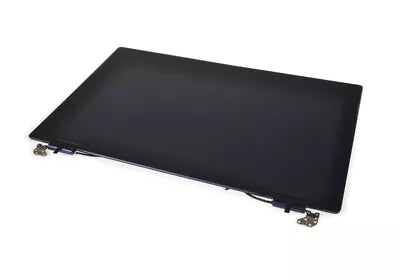
BA96-07668B Assemblage d'écran LCD - Service bleu marine
  • Samsung LCD Display Assembly - BA96-07668B is a genuine OEM Samsung Laptop replacement part designed to provide a clear display for your device.
  • Replaces a cracked or broken display, which can affect visibility and usability of the laptop.
  • This assembly is installed at the front of the laptop, serving as the primary interface for interaction and viewing.
  • Manufactured by Samsung, it provides OEM fit, original quality, durability, and reliable functional performance.
  • Helps restore full functionality to your laptop, avoiding the need for costly repairs to the entire unit.
Read More

$844.95

Modèles compatibles

The BA96-07668B Assemblage d'écran LCD - Service bleu marine est le remplacement correct pour les numéros de modèle suivants.

Description

Samsung Laptop LCD Display Assembly BA96-07668B

The Samsung Laptop LCD Display Assembly BA96-07668B is a genuine OEM replacement part designed to restore the performance and reliability of your Laptop. Built to original factory specifications, it ensures proper fit and dependable operation, providing long-lasting durability to keep your device functioning optimally.

When the LCD Display Assembly becomes worn, damaged, or fails, replacing it restores device performance and helps reduce the risk of future issues such as screen flickering or display failures. Keep your laptop's screen clear and functional with this essential part.


Key Features

  • Genuine Samsung OEM replacement part
  • Reliable performance
  • Manufactured to original factory specifications
  • Proper fit and compatibility
  • Helps restore your Laptop to optimal working condition

Common Signs of a Faulty LCD Display Assembly

If your Laptop is experiencing any of the following issues, the LCD Display Assembly may need replacement:

  • Screen not turning on or displaying correctly
  • Visible cracks or physical damage on the display
  • Flickering or distorted images
  • Unusual colors or lines on the screen
  • Inability to adjust brightness or contrast
  • Frequent disconnections or screen glitches

Installation Instructions

  1. Disconnect the Laptop from the power supply.
  2. Remove the battery if applicable.
  3. Carefully detach the existing LCD Display Assembly.
  4. Install the new Samsung LCD Display Assembly.
  5. Reconnect any cables or connectors.
  6. Reassemble the laptop casing.
  7. Reconnect the battery.
  8. Restore power and test operation.

Note: Always refer to your device's service manual or consult a qualified technician if you are unsure about the installation process.


Return Policy

  • Hassle-free returns within 30 days of purchase
  • Items must be unused and in their original packaging
  • Quick refunds issued after inspection of returned products
  • Free replacement for defective or damaged items
  • Friendly customer support for a smooth and transparent return process

Shop with Confidence

When you order from bekopartstore.com, you can shop with confidence knowing you're purchasing genuine Samsung OEM replacement parts backed by dependable customer service.

  • Genuine Samsung OEM replacement parts
  • Fast order processing and shipping
  • Secure online ordering
  • Hassle-free returns
  • Dedicated customer support

Samsung Laptop LCD Display Assembly BA96-07668B

The Samsung Laptop LCD Display Assembly BA96-07668B is a genuine OEM replacement part designed to restore the performance and reliability of your Laptop. Built to original factory specifications, it ensures proper fit and dependable operation, providing long-lasting durability to keep your device functioning optimally.

When the LCD Display Assembly becomes worn, damaged, or fails, replacing it restores device performance and helps reduce the risk of future issues such as screen flickering or display failures. Keep your laptop's screen clear and functional with this essential part.


Key Features

  • Genuine Samsung OEM replacement part
  • Reliable performance
  • Manufactured to original factory specifications
  • Proper fit and compatibility
  • Helps restore your Laptop to optimal working condition

Common Signs of a Faulty LCD Display Assembly

If your Laptop is experiencing any of the following issues, the LCD Display Assembly may need replacement:

  • Screen not turning on or displaying correctly
  • Visible cracks or physical damage on the display
  • Flickering or distorted images
  • Unusual colors or lines on the screen
  • Inability to adjust brightness or contrast
  • Frequent disconnections or screen glitches

Installation Instructions

  1. Disconnect the Laptop from the power supply.
  2. Remove the battery if applicable.
  3. Carefully detach the existing LCD Display Assembly.
  4. Install the new Samsung LCD Display Assembly.
  5. Reconnect any cables or connectors.
  6. Reassemble the laptop casing.
  7. Reconnect the battery.
  8. Restore power and test operation.

Note: Always refer to your device's service manual or consult a qualified technician if you are unsure about the installation process.


Return Policy

  • Hassle-free returns within 30 days of purchase
  • Items must be unused and in their original packaging
  • Quick refunds issued after inspection of returned products
  • Free replacement for defective or damaged items
  • Friendly customer support for a smooth and transparent return process

Shop with Confidence

When you order from bekopartstore.com, you can shop with confidence knowing you're purchasing genuine Samsung OEM replacement parts backed by dependable customer service.

  • Genuine Samsung OEM replacement parts
  • Fast order processing and shipping
  • Secure online ordering
  • Hassle-free returns
  • Dedicated customer support
En savoir plus

Expédition et livraison

Cette pièce convient-elle à mon modèle ?

    Have a question?